Ce site web utilise des cookies
Pour plus d'informations sur la façon dont nous utilisons les cookies, vous pouvez lire notre Notification sur la confidentialité et les cookies

Pour plus d'informations sur la façon dont nous utilisons les cookies, vous pouvez lire notre Notification sur la confidentialité et les cookies

Disponible

Retours gratuits sur 10 jours.Détails
Salim shop boutique
78%Évaluation du vendeur
1 Abonnés
Vitesse d'expédition: Excellent
Score Qualité: Excellent
Taux d'annulation: Mauvais
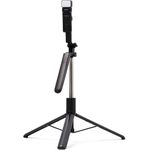
Selfle Stick Introductions
The Phone Clip con be
rotated 360 degree.
The telescopic shaft con
be stretched freely
The Rluetooth remote
control is detachable.
he arip can be unfolded
into a stable tripod.
Fill Light (options)
Charaing Port
Power Button
1.Power Button: Turmon/off the light;
Change tha ightina modeB able
Reminder: The fiIL liaht is assembled for
some models. Please refer to the model of
1the purchdsed produc
Detachable Remote
Take out Mount
Quick Steps for Remote
Step 1: On your phone, tap Settings> Bluetooth,
and then turn on the Bluetooth.
Step 2: Hold down the shutter button (about 2s)
until indicator light starts flashing to turn on the
remote control.
Step 3: Once the Bluetooth name of "Selfie"
appears in the display, select it and tap "pair".
Step 4: Press the Shutter button to take photos.
Step 5: Hold down the shutter button (about 3s)
until indicator light goes out to turn off the
remote control.
Reminder: The remote control is comoatible
with Android 4.3,10S 5.0 and later.
Replace the Battery
Reminder: The Bluetooth remote control
has two types. Please follow the corresponding
steps to replace the battery according to the
type of your purchased product.
1. Covering Type
Force apart the upper shell at the groove on the
side of the remote with fingernail, then replace
the battery,and finally fastenthe shell back.
2. Sliding Type
Slide the bock cover in the direction of the arrow
as shown, then replace a new battery, and
finally insert the cover back.
CE FC RHS A
Selfle Stick Introductions
The Phone Clip con be
rotated 360 degree.
The telescopic shaft con
be stretched freely
The Rluetooth remote
control is detachable.
he arip can be unfolded
into a stable tripod.
Fill Light (options)
Charaing Port
Power Button
1.Power Button: Turmon/off the light;
Change tha ightina modeB able
Reminder: The fiIL liaht is assembled for
some models. Please refer to the model of
1the purchdsed produc
Detachable Remote
Take out Mount
Quick Steps for Remote
Step 1: On your phone, tap Settings> Bluetooth,
and then turn on the Bluetooth.
Step 2: Hold down the shutter button (about 2s)
until indicator light starts flashing to turn on the
remote control.
Step 3: Once the Bluetooth name of "Selfie"
appears in the display, select it and tap "pair".
Step 4: Press the Shutter button to take photos.
Step 5: Hold down the shutter button (about 3s)
until indicator light goes out to turn off the
remote control.
Reminder: The remote control is comoatible
with Android 4.3,10S 5.0 and later.
Replace the Battery
Reminder: The Bluetooth remote control
has two types. Please follow the corresponding
steps to replace the battery according to the
type of your purchased product.
1. Covering Type
Force apart the upper shell at the groove on the
side of the remote with fingernail, then replace
the battery,and finally fastenthe shell back.
2. Sliding Type
Slide the bock cover in the direction of the arrow
as shown, then replace a new battery, and
finally insert the cover back.
CE FC RHS A

Les clients ayant acheté ce produit n'ont pas encore émis d'avis.